Workflows
The 2026 Scanlation Toolchain: From Manual Photoshop Nights to One-Click AI Pipelines
Updated 2026-07-31
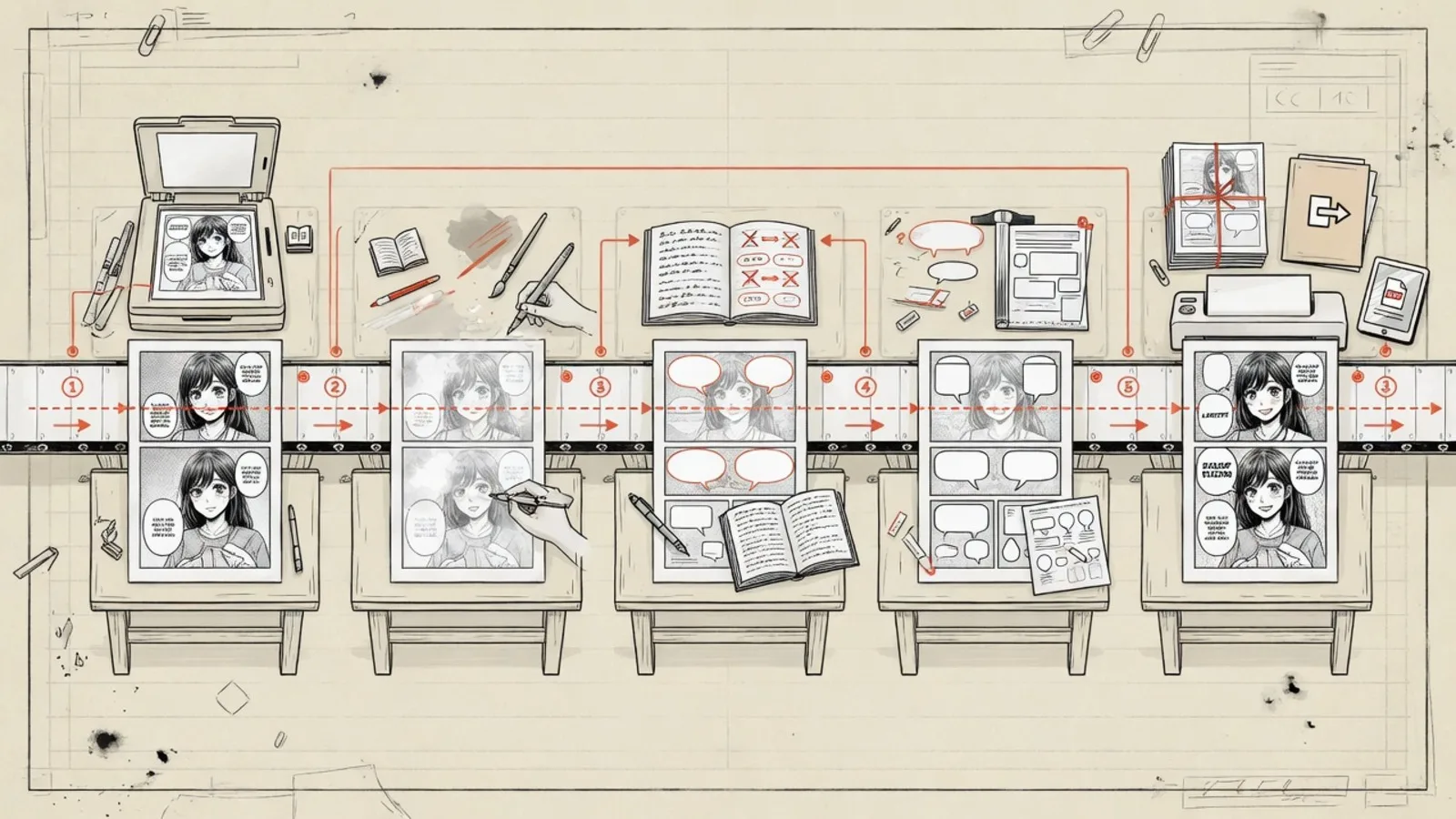
A map of the 2026 manga production toolchain—cleaning, OCR, MT, lettering—and where AI actually saves overnight labor (with copyright caveats).
If you're still running the old-school scanlation workflow in 2026—Photoshop per-page cleaning → manual transcription → hand-typesetting every bubble—you probably haven't slept through a full night in a while.
That's not hyperbole. Public scanlation group recruitment pages still list cleaner, redrawer, and typesetter as the three most desperately needed and hardest-to-fill roles. A single 18-page chapter of medium-complexity black-and-white manga runs 4.5 to 8.5 person-hours on the traditional pipeline. And that's before you even count translation and proofreading. This is why so many fan groups burn out—not for lack of passion, but because the labor-to-output ratio is brutal.
But here's the good news in 2026: the toolchain has fundamentally changed. OCR, machine translation, AI inpainting, and automated typesetting aren't lab demos anymore. They're a real, functional production line you can actually use. This article breaks down the full 2026 scanlation toolchain—what you use at each step on both the traditional and AI-assisted paths, how much time each takes, where things break—and why AI Manga Translator is the most "plug-and-play" option in the entire ecosystem.
The Real Bottleneck Isn't Translation. It's Image Editing.
A lot of people assume scanlation is bottlenecked on translation—because, you know, Japanese is hard. But anyone who's actually run a full chapter knows better. Translation is arguably the lightest link in the chain. The real time sinks are these three:
- Cleaning and redrawing: Erasing Japanese sound effects embedded in screentones, speed lines, and double-page spreads—then reconstructing the artwork underneath. This isn't "paint it white." You have to match screentone density, reconnect line art, and maintain tonal continuity. Across scanlation training guides, redrawing is universally acknowledged as the hardest, rarest skill in the pipeline.
- OCR for manga text: Vertical Japanese, furigana annotations, multi-line bubbles, text over artwork—manga text layout is nothing like "printed characters on a clean page." General-purpose OCR regularly fails on manga pages, and even manga-ocr, the specialized model built for this exact task, gets less reliable with longer text blocks and can hallucinate plausible-looking sentences in blank areas.
- Typesetting and layout: Font choice, weight, line breaking, stroke thickness, bubble margins, vertical-to-horizontal switching—this isn't "stuff the translation back in." It's visual design. If the typesetter messes it up, the reader feels it on the first page without knowing why.
So the real question in 2026 isn't "can AI do scanlation?" It's "which steps can AI save real hours on, and which steps still need a human?"
The 2026 Scanlation Toolchain: Two Paths, One Ledger
Based on the latest 2026 research, the scanlation toolchain has clearly split into two routes. Let's break down every step, with tools and labor costs side by side.
The Traditional Path: Photoshop/CSP-Centered Manual Pipeline
This is what most established scanlation groups still use:
Raw scan → ImageMagick batch crop/color-correct → Photoshop cleaning & redrawing
→ Manual OCR or transcription → Human translation → Photoshop typesetting
→ Dual-person QC → Export & release
Core tools: Adobe Photoshop (from US$22.99/month) or Clip Studio Paint EX (US$277 perpetual license), with ImageMagick (free, open source) for batch preprocessing, and NAPS2 or VueScan for scanning.
Typical labor: a medium-complexity 18-page B&W chapter runs roughly 4.5–8.5 person-hours. Maintaining a weekly release schedule means at least 3–5 people working consistently behind the scenes.
The problem isn't quality—a skilled redrawer + typesetter combo can hit publication-grade work. The problem is throughput. One person goes on hiatus, one chapter has wall-to-wall sound effects, and the schedule collapses.
The AI-Assisted Path: OCR + MT + Auto-Typesetting Semi-Automated Pipeline
By 2026, this path is genuinely mature:
Raw scan → Local preprocessing → [BallonsTranslator / Koharu / AI Manga Translator]
→ Auto bubble detection → OCR → Terminology-constrained AI translation
→ AI inpainting → Auto typesetting → Export PSD/PNG → Human refinement + dual QC → Release
Here's the tool split at each step:
| Step | Traditional Go-To | AI-Assisted Alternative | Labor Saved |
|---|---|---|---|
| Scanning & Preprocessing | NAPS2 / VueScan + ImageMagick | Same + waifu2x for denoising/upscaling | ~10% |
| Cleaning / Inpainting | Manual Photoshop | LaMa / AOT / PatchMatch auto-erase + manual touch-up | 30–50% (up to 60% on simple backgrounds) |
| OCR Text Extraction | Manual transcription | manga-ocr + Tesseract / PaddleOCR | 70–90% |
| Translation | Pure human | DeepL / Google Cloud Translation + glossary + human post-edit | 40–60% |
| Typesetting | Manual Photoshop / CSP | BallonsTranslator / Koharu auto-typeset → export editable PSD | 30–50% |
Real numbers: under comparable conditions, the AI-assisted pipeline compresses labor to 2.5–5.5 person-hours per chapter—roughly 35%–45% less than the traditional path. But for works heavy on screentones, speed lines, and over-art SFX, the savings drop sharply to 15%–25%.
How Big Is the Efficiency Gap? It Depends on the Manga.
The time difference between the two toolchains isn't a fixed number. It depends heavily on the type of manga you're working on:
| Scenario | Traditional Per Page | AI-Assisted Per Page | Time Saved | Verdict |
|---|---|---|---|---|
| Dialogue-heavy, clean bubbles, simple backgrounds | 18 min | 7–9 min | 50%–61% | AI's strongest case |
| Medium complexity, occasional SFX over art | 15–22 min | 9–14 min | 27%–40% | Most common |
| Dense screentones, speed lines, heavy SFX redraw | 24–35 min | 18–28 min | 15%–25% | AI helps marginally |
| Internal reading draft only, no publication-grade typesetting | 10–16 min | 4–7 min | 50%–60% | AI's ideal scenario |
The conclusion is clear: AI cuts out the most mechanical, templatable time—but not the hardest time. In a manga chapter, the most expensive work isn't typing. It's complex redrawing, culturally-loaded translation choices, and that final round of visual QC. The denser these three are in any given work, the faster AI's efficiency advantage shrinks.
This matches the 2026 community consensus perfectly: AI didn't replace scanlation groups. It just moved people from factory-floor positions to finishing-work positions.
The 2026 AI Tool Matrix: Who's Actually Building a Real Manga Pipeline?
There are plenty of tools with "manga translation" in their marketing copy. But the number that genuinely chain together detection → OCR → inpainting → translation → typesetting into a usable pipeline remains in the single digits in 2026:
BallonsTranslator (Open Source / GPL-3.0)
The most feature-complete open-source option. Supports 15+ translation engines, context-aware LLM translation, translation history, and reusable glossaries. Built-in inpainting with AOT, LaMa, and PatchMatch algorithms. Rich text editing, Word import/export, and headless batch mode. Active Chinese-language community (Simplified Chinese README + QQ group).
Best for: Technical users willing to invest time configuring their toolchain. If you're already on Photoshop + manual translation and want to gradually introduce AI without flushing your entire workflow—BallonsTranslator is the most natural bridge.
Koharu (Open Source / GPL-3.0)
The 2026 newcomer to watch. Built around "local-first" philosophy—all models run on your hardware, nothing leaves your device. Its text renderer is deeply optimized for manga lettering: Unicode-aware OpenType shaping, script-aware line breaking, vertical CJK with constraint-box fitting, and export to PSD with editable text layers. Also supports local GGUF/llama.cpp models, HTTP API, and MCP protocol.
Best for: Users with hard privacy requirements (unpublished manuscripts, commissioned translations, doujinshi). The tradeoff: initial model downloads and local compute requirements are significant.
Manga/Image Translator (Open Source / GPL-3.0)
Supports Docker, web, and CLI deployment. One-click translation of text in images, with inpainting and typesetting. Large codebase, more complex configuration, output stability depends on model combinations.
Best for: Users who enjoy tinkering with configuration and want maximum flexibility.
AI Manga Translator (Commercial / Web-Based)
What do the three tools above have in common? You have to install them. Configure them. Debug the models yourself. For users who don't want to mess with any of that—or who want to quickly test "can AI actually handle this manga I'm working on?"—AI Manga Translator is the lowest-friction option in the entire space.
Its logic is dead simple: upload a manga page → automatic bubble detection → OCR → AI translation → auto-erase and inpaint → export the finished page. No Python environment to set up. No multi-gigabyte models to download. No Docker to configure. Browser-based, works immediately.
Best for: Anyone who wants results now, not after an afternoon of environment setup. New users get 10 free credits—enough to translate a full chapter and see exactly how much labor AI can save on your specific manga.
Legal & Privacy: AI Didn't Change the Rules, It Just Made Compliance Harder to Ignore
This section needs to be straightforward.
Scanlation has never been a "gray but safe-by-default" activity in legal terms. The Berne Convention explicitly reserves the right of translation and the right of adaptation as exclusive rights of the author (see Berne Convention Article 8 on the right of translation, and Article 12 on the right of adaptation). Under U.S. law, the Copyright Act defines "derivative work" to include translations, making unauthorized translations a direct infringement of the copyright holder's exclusive right to prepare derivative works. The U.S. Copyright Office has consistently applied this interpretation—see 17 U.S.C. § 101 for the statutory definition of derivative works, and Circular 14: Copyright in Derivative Works and Compilations for the Office's official guidance. Platforms hosting fan translations have repeatedly faced DMCA takedown notices and platform-level legal events (for historical context on DMCA enforcement against fan translation sites, see the U.S. Copyright Office's DMCA summary).
Upgrading to an AI toolchain doesn't change any of this.
The most practical compliance framework is straightforward—know your source and your use case:
- Legally purchased physical volume + local OCR for personal study: Lowest risk.
- Publishing unauthorized translations on aggregation platforms: Highest risk.
- Long-term team-based production: Consider moving toward authorized collaborations, doujinshi creator permissions, or platform partnerships. There are real precedents for fan groups successfully transitioning to official collaborations.
Separately, 2026 has introduced a privacy vector a lot of people overlook: data exfiltration. Any time you use cloud OCR, cloud MT, or remote LLMs, your page text—potentially entire page images—gets sent to third-party servers. For unpublished manuscripts or sensitive content, this matters.
AI Manga Translator's approach: all translation content is encrypted end-to-end during transmission. Nothing is retained after processing. Nothing is used for model training of any kind. This strikes a reasonable balance—you get the translation quality that cloud compute enables, without worrying about your manga pages sitting on someone else's server. For users subject to the GDPR (EU/EEA), this no-retention policy aligns with the data minimization principle under GDPR Article 5(1)(c). California residents can reference analogous requirements under the CCPA.
The Final Recommendation: How Should You Build Your 2026 Scanlation Toolchain?
Conclusion first, explanation after:
| Your Situation | Recommended Toolchain |
|---|---|
| Already on PS/CSP, want to gradually add AI | BallonsTranslator + DeepL API + Photoshop for refinement |
| Hard privacy requirements (unpublished work, commissions) | Koharu (full local pipeline) + manual polish |
| Technical, willing to tinker with config | Manga/Image Translator (Docker deployment) |
| Don't want to tinker—want to see what AI can save right now | AI Manga Translator → export → manual touch-up |
| Personal reading only, no publication-grade typesetting | AI Manga Translator, one and done |
If you're already running a traditional Photoshop pipeline: AI Manga Translator lets you skip the most mechanical 2–3 hours per chapter—cleaning, OCR, first-pass translation, and initial typesetting—so you only do review and polish.
If you're an individual reader who doesn't want to touch any tool configuration: drag in a file, get back a finished page, manually fix anything you don't like. This is the closest thing to "one-click scanlation" in 2026.
The through-line is the same point this article opened with: AI can't eliminate the need for human judgment. But it can ensure that your time gets spent on the work that actually requires human judgment—not on erasing text and retyping it.
Want to see how much time AI can save on your manga? AI Manga Translator gives new users 10 free credits—enough to translate a full chapter and see the results for yourself.
This article is based on a systematic review of the 2026 scanlation toolchain landscape, conducted in July 2026. Sources include official documentation and GitHub repositories for BallonsTranslator, Koharu, and Manga/Image Translator; official pricing pages for Adobe and CELSYS; the manga-ocr academic paper and Manga109-s benchmark; public scanlation group recruitment pages and community training guides. All efficiency figures are synthetic estimates derived from publicly documented workflows, tool capabilities, and community practices—not industry-official statistics. Legal references: Berne Convention (WIPO), 17 U.S.C. § 101, U.S. Copyright Office Circular 14, DMCA Summary (U.S. Copyright Office), GDPR Article 5, and CCPA (California AG).